
Download Photo2Web Publisher – photo gallery, publish photos online, online photo album, web gallery, HTML code generator, photo publishing tool
Overview
Photo2Web Publisher is a productivity-focused tool designed to simplify the process of transforming personal photo collections into professional-looking online galleries. The application enables users to publish their images directly to the web with minimal effort, making it an ideal solution for individuals and small organizations seeking a straightforward way to share visual content. By generating HTML code automatically, the software eliminates the need for manual coding or web development expertise, lowering the barrier to entry for digital content publishing.
Target users include amateur photographers, event organizers, educators, and small business owners who need to showcase images without investing in complex web platforms. The app’s core purpose lies in bridging the gap between local photo storage and public web visibility. It solves the common problem of fragmented sharing—such as relying on email attachments or third-party platforms with limited customization—by offering a self-hosted, customizable solution. Although the developer did not provide additional technical details, the app’s long-standing presence in the productivity space since its release in 2003 suggests a stable and functional design.
Real-world use cases include creating portfolio displays, sharing family event albums, or presenting project visuals for educational or business purposes. Its role in the broader app ecosystem is notable as a lightweight, dedicated utility that complements more complex web tools. Despite its age, the app remains relevant for users who value simplicity, control, and direct output over cloud-based dependencies.
Key Features & Functionality
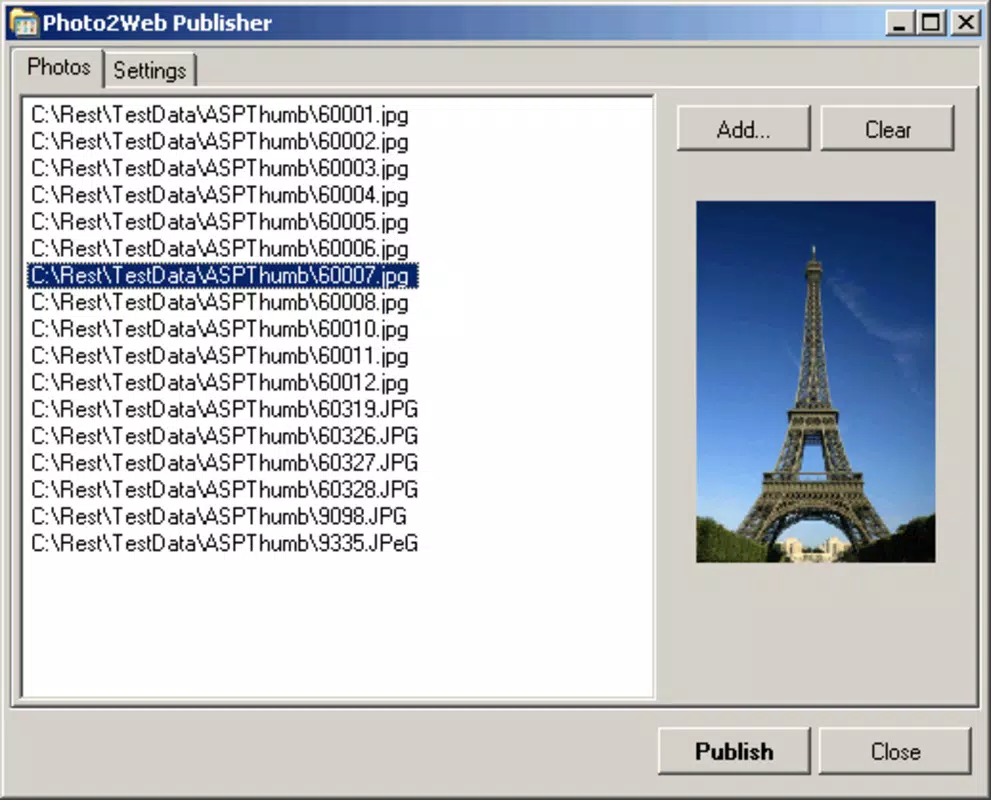
- Easy Photo Selection: Users can quickly browse and select images from their local storage with a single click, streamlining the initial setup of a gallery. This intuitive interface ensures accessibility for users of all technical skill levels.
- One-Click Publishing: By pressing the 'publish' button, the application automatically generates the necessary HTML code required to display the photo gallery on a website. This feature significantly reduces the time and complexity involved in web publishing.
- Customization Options: The software allows users to tailor the appearance of their gallery by selecting color schemes, adjusting photo dimensions, and defining the number of images per page. This flexibility supports personal branding and visual consistency across platforms.
- Resizing Photos: Photo2Web Publisher includes built-in tools to resize images to fit the chosen layout, ensuring uniformity and optimal display quality without compromising image clarity.
For example, a high school teacher might use the app to create a gallery of student projects, selecting images with a few clicks, customizing the layout to match school colors, and publishing the result with one button. Similarly, a small business owner could generate a visual portfolio for services rendered, maintaining a consistent aesthetic across client-facing content. These features collectively enhance usability and empower users to publish polished, professional galleries without technical overhead.
Interface, UX & Performance
Photo2Web Publisher features a clean, minimalistic interface that prioritizes functionality over visual flair. The layout is structured around a central workspace for photo selection and a control panel for customization settings. Navigation is linear and predictable, guiding users through the publishing workflow with clear labels and button placement. This design approach supports rapid onboarding, especially for users unfamiliar with web publishing tools.
Although the developer did not list formal performance metrics, the app’s lightweight file size of 2.3 MB suggests efficient resource usage. It is likely optimized for older or lower-end systems, which aligns with its long-standing presence on Windows platforms. The application appears to respond promptly to user inputs, with minimal lag during photo selection and publishing processes. Stability is implied by its continued availability and use since 2003, though no specific error reports or crash data were provided.
Responsiveness across different screen resolutions and device categories has not been formally disclosed. However, given its desktop-centric design and target platform, it is expected to function reliably on standard Windows environments. The absence of cloud sync or real-time collaboration features reinforces its role as a standalone utility rather than a connected service.
Platform Compatibility & Technical Requirements
Photo2Web Publisher is designed exclusively for the Windows operating system. The current version, 1.0.1, is compatible with Windows platforms, though specific OS versions were not listed by the developer. The file size of 2.3 MB indicates a compact installation, making it suitable for systems with limited storage capacity.
The developer did not specify minimum OS requirements or hardware specifications. As such, users are advised to test the application on their system to ensure compatibility. Given its release date in 2003, the software may perform best on older Windows versions, though modern Windows systems may still support it through compatibility modes. No information was provided regarding updates, patches, or future development plans.
Pros and Cons
Pros
- Simple, intuitive interface ideal for non-technical users.
- One-click publishing eliminates the need for coding or web hosting setup.
- Customization options allow for personalization of gallery appearance.
- Lightweight size (2.3 MB) ensures fast installation and low system impact.
- Free to download and use, making it accessible for budget-conscious users.
Cons
- No information provided on compatibility with modern Windows versions.
- Limited to Windows platform—no support for macOS, iOS, or Android.
- Outdated release date (2003) raises concerns about long-term support and security.
- No cloud integration or mobile access for gallery management.
- Customization options may be limited compared to modern web publishing tools.
FAQ
Is Photo2Web Publisher safe to download and install?
Yes, the app is free and available from official sources. However, due to its age, users should ensure their system is protected with updated antivirus software before installation.
Can I use Photo2Web Publisher on my Mac or mobile device?
Currently, the application is only available for Windows. There is no official support for macOS, iOS, or Android devices.
Does the app require an internet connection to publish photos?
While the app generates HTML code locally, an internet connection is required to upload the output files to a web server or hosting platform.
How do I update Photo2Web Publisher?
As of now, no update mechanism or release history has been publicly documented. Users should check the official website for any available version upgrades.
Can I customize the appearance of my photo gallery?
Yes, the app offers customization options such as color selection, photo sizing, and layout settings to tailor the gallery to personal or brand preferences.
Final Thoughts
Photo2Web Publisher stands as a reliable, no-frills solution for users who need to publish photo galleries online without technical complexity. Its core strengths—simplicity, one-click publishing, and customization—make it a valuable tool for individuals and small teams focused on visual storytelling. While its age and lack of modern features may deter some users, its lightweight design and free availability offer enduring appeal for basic web publishing needs.
Those who value control over their content, prefer self-hosted solutions, and require minimal setup will find the app particularly beneficial. Despite its limitations in platform reach and update frequency, Photo2Web Publisher remains a functional utility in the productivity space.
Download Photo2Web Publisher now


